> ## Documentation Index
> Fetch the complete documentation index at: https://docs.aversure.com/llms.txt
> Use this file to discover all available pages before exploring further.
# Submitting questions
> How to submit questions in the Q&A panel
To submit a question:
1. Inside a data room, bring forward the Q\&A panel by pressing the **Q\&A** button below the folder tree.
2. Click on the **Ask question** button at the top left of the Q\&A panel.
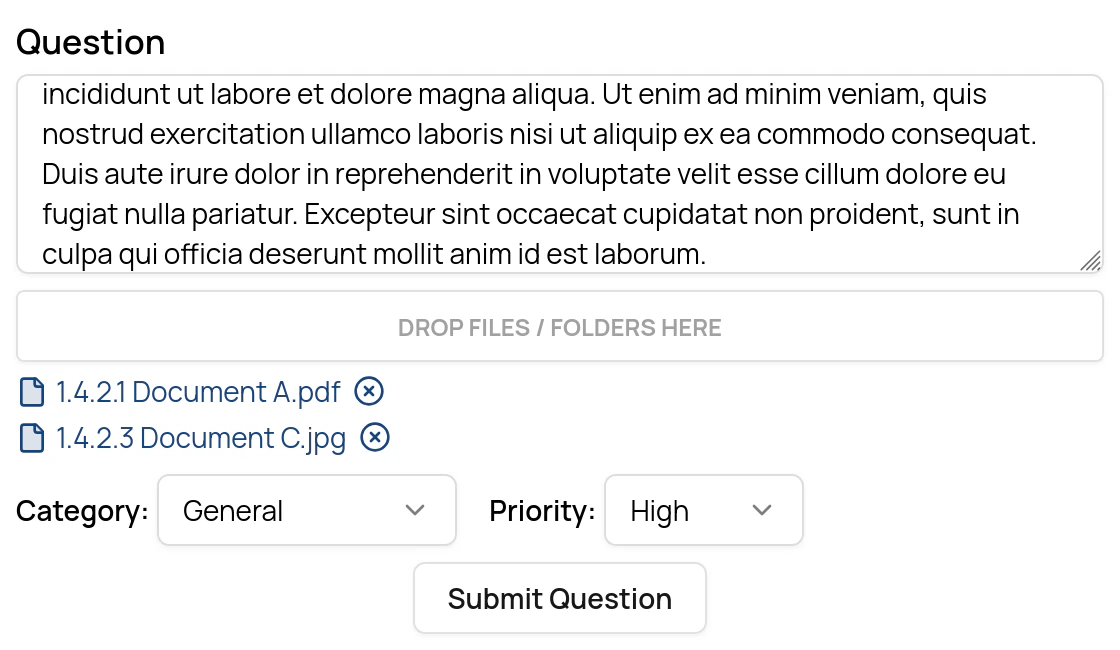
3. Enter a question in the dialog that appears.
* You can attach one or more files or folders to the question. Files or folders are attached by dragging them from the data room down to the file box in the Q\&A panel.
* You can also propose a **category** and a **priority** for the question.
4. Submit the question by clicking on the **Submit** button at the bottom of the Q\&A panel.
 The progress of a question can be tracked by the submitting user by clicking on the **My questions** selector in the Q\&A panel.
After a question has been submitted, it must be [accepted](/qa/accepting-and-distributing-questions) in order to be visible to other users in the data room. It can also be sent back to the submitter with a comment attached.
Questions may only be submitted inside a data room (not in the Administration Interface).
The progress of a question can be tracked by the submitting user by clicking on the **My questions** selector in the Q\&A panel.
After a question has been submitted, it must be [accepted](/qa/accepting-and-distributing-questions) in order to be visible to other users in the data room. It can also be sent back to the submitter with a comment attached.
Questions may only be submitted inside a data room (not in the Administration Interface).